
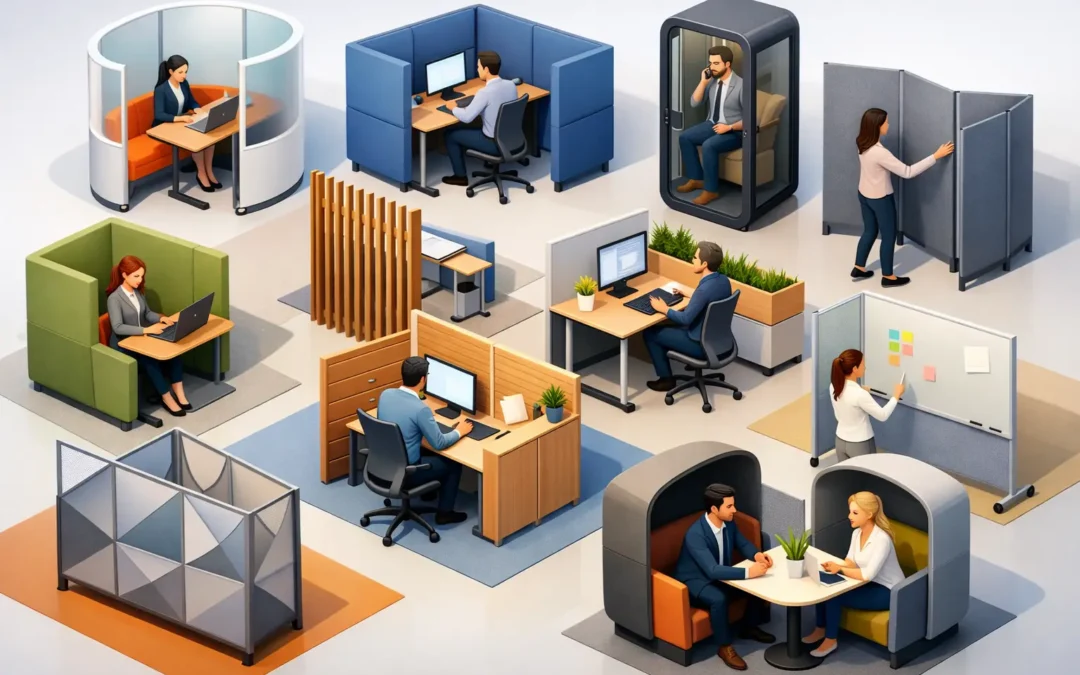
A workstation can look open and modern yet still leave people exposed to every phone call, screen glance, and nearby conversation. The right office partition ideas for privacy create a more comfortable place to work without turning the office into a row of closed rooms. For managers and facility teams, the goal is not simply to divide space. It is to give people the level of visual and acoustic separation their work actually requires.
Start With the Type of Privacy You Need
Privacy is not one-size-fits-all. A customer service team may need modest screen privacy while staying easy to approach. An HR department handling employee records needs stronger visual separation and controlled access. Finance, legal, design, and management teams may also need quieter settings for focused work or confidential discussion.
Before choosing a partition, consider what is causing the disruption. Is it visual distraction, noise, a lack of personal space, or traffic moving past desks? This step prevents a common mistake: buying tall panels to solve a noise issue, or adding acoustic materials when the real issue is people walking directly behind staff.
Also consider how often the layout may need to change. Fixed partitions work well for established departments and long-term offices. Freestanding screens, mobile panels, and modular workstation systems are better when teams grow, shift, or share spaces for different activities.
Office Partition Ideas for Privacy That Work
1. Desk-mounted privacy screens
Desk-mounted screens are a practical choice for open-plan workstations. They sit between neighboring desks or along the front edge of a shared bench, creating a clear personal boundary without changing the entire room.
Choose opaque fabric, laminate, or frosted panels when screen privacy is the priority. Fabric-covered screens can also help soften surrounding sound, especially in busy departments. Lower screens preserve easy communication, while taller screens give more visual focus. The best height depends on whether employees need to collaborate across desks throughout the day.
2. Modular workstation partitions
Modular workstation partitions combine desks, divider panels, storage, and cable management into one coordinated setup. They are particularly useful when furnishing a new office or reorganizing a department with multiple employees.
This approach creates consistent workstation sizes and walkways, which makes the office look organized and easier to manage. It also allows different privacy levels within the same floor plan. For example, customer-facing staff can use lower panels, while accounting or administration can have taller dividers and side returns.
3. Freestanding floor screens
Freestanding partitions are among the most flexible options for offices that need an immediate privacy improvement. They can separate a desk from a corridor, create a quiet corner, or shield a temporary workstation without construction work.
These screens are useful in leased offices, training rooms, shared studios, and reception back-office areas. Look for stable bases and materials that are easy to maintain. Lightweight screens are convenient to move, but they should not feel unstable in high-traffic locations.
4. Frosted glass partitions
Glass partitions keep an office bright while reducing direct visibility. Frosted, patterned, or partially frosted glass works well for meeting rooms, manager offices, consultation areas, and reception-adjacent spaces where daylight matters.
The trade-off is acoustics. Standard glass creates visual privacy but does not automatically block conversation. If meetings involve sensitive information, choose a system with proper door seals, suitable wall construction, and acoustic treatment around the room. A glass partition should support the way the room is used, not just the look of the office.
5. Full-height solid partitions
For confidential departments or executive functions, full-height solid partitions offer the strongest sense of enclosure. They can create enclosed offices, interview rooms, records areas, and private meeting spaces within a larger workplace.
This solution requires more planning than desk screens. Door positions, electrical points, ventilation, lighting, fire requirements, and circulation all need to be considered before installation. However, when privacy is essential, a properly planned enclosed room is often more useful than trying to make an open workspace perform like a private office.
6. Acoustic fabric panels
Noise is one of the biggest reasons employees ask for more privacy. Acoustic fabric panels can be used as desk dividers, freestanding screens, or wall-mounted features. They help reduce sound reflections and make conversations feel less intrusive.
They will not make an open office silent, and they cannot replace a private room for confidential calls. Still, they can make a noticeable difference in areas with hard floors, bare walls, and many people speaking at once. Pairing acoustic panels with carpet tiles, soft seating, and sensible desk spacing often produces a better result than relying on one product alone.
7. Storage units as space dividers
Low cabinets, shelving units, and lockers can divide work zones while adding valuable storage. This is a smart option for offices where every square foot must do more than one job.
A cabinet between workstations can reduce direct sightlines and give staff convenient access to files or supplies. For safety, tall storage dividers should be securely installed and positioned so they do not block exits, natural light, or sprinkler coverage. Open shelving feels lighter, while closed cabinets provide stronger visual separation and a tidier appearance.
8. Mobile folding partitions
Mobile folding partitions allow one room to serve several purposes. A training room can become two smaller classrooms. A large meeting area can be divided for workshops. An office can set up a temporary private discussion zone when needed.
These partitions are most effective when they are easy for staff to operate and have a designated storage position. If a partition is heavy, awkward, or has nowhere to go when folded, it may remain unused. For frequent reconfiguration, choose a commercial-grade system built for regular movement.
9. Reception and waiting-area dividers
Privacy starts before a visitor enters the main office. Reception counters with raised transaction sections, side panels, or controlled access points can help protect staff screens and visitor information. Freestanding screens can also separate waiting seats from work areas without making the entrance feel unwelcoming.
For clinics, education centers, service counters, and property management offices, consider sightlines from the entrance. Visitors should know where to go, but they should not be able to read documents, see internal schedules, or overhear every conversation at the reception desk.
10. Privacy pods and enclosed focus zones
For teams that make frequent calls or need deep-focus time, an enclosed focus pod or compact private booth can be more effective than adding higher desk partitions everywhere. It provides a place for video calls, one-to-one conversations, or concentrated work without assigning every employee a separate office.
This option works best when the office has sufficient floor area and the pod is placed away from main walkways. Ventilation, power access, and user demand all matter. One small booth may be enough for a team of ten, but it can become a bottleneck for a large sales or support department.
Plan the Layout Before You Purchase
Good partitions support movement as well as privacy. Leave clear routes to exits, printers, storage, meeting rooms, and shared equipment. Avoid placing tall panels where they make an already compact office feel dark or restrict supervision in areas that need active team coordination.
A useful layout often groups work by activity. Put high-concentration roles away from reception, pantry areas, and busy corridors. Locate collaborative teams where conversation is expected. Use partitions to create gradients of privacy rather than treating every desk the same.
It is also worth planning power and data cables at the same time. A well-designed workstation partition can conceal cables and keep desks easier to clean, but only if electrical access is considered early. Retrofitting cables after furniture is installed can add unnecessary disruption and cost.
Choose a Partner That Can Handle the Details
Partition selection is easier when it is part of a complete workplace plan. Measurements, workstation sizes, storage needs, delivery access, and installation timing all affect the final result. Wawasan Office can help businesses coordinate furniture, partitions, space planning, delivery, and on-site assembly so the office is ready for work rather than left waiting for multiple suppliers.
The most successful privacy solution is rarely the tallest panel or the most expensive system. It is the one that gives each team enough concentration, confidentiality, and comfort while keeping the workplace practical, welcoming, and easy to adapt as the business changes.